If your car already supports wired Apple CarPlay, you may have noticed one small but annoying problem: you still need to connect your iPhone with a USB cable every time you get into the car. A CarPlay wireless adapter can make that experience much easier by turning a compatible wired CarPlay system into a wireless connection.
For many drivers, this is a simple upgrade that can make everyday driving more convenient. But with so many adapters available, choosing the right one can be confusing. In this guide, we will explain what these adapters do, what features you should check, and how to choose the right option for your vehicle.
What Is a CarPlay Wireless Adapter?
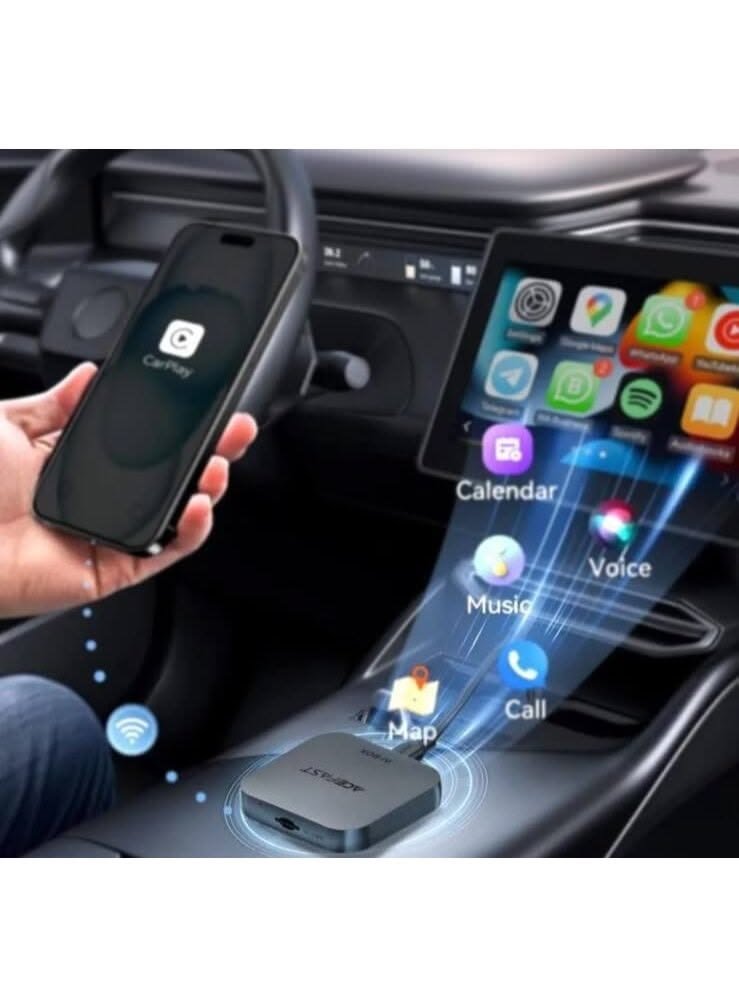
A wireless CarPlay adapter is a small device that connects to the USB port used by your car’s existing wired CarPlay system. Instead of plugging your iPhone directly into the car, the adapter creates a wireless connection between your phone and the vehicle.
Once the initial setup is complete, your iPhone can usually connect automatically when you start the car. You can then access supported apps such as navigation, music, calls, and messages through your vehicle’s display.
One important thing to remember is that these adapters are generally designed for cars that already have wired Apple CarPlay. They usually cannot add CarPlay to a vehicle that does not support it at all.
Why Use a Wireless CarPlay Adapter?
The biggest advantage is convenience. You do not have to search for a charging cable every time you enter your vehicle.
A good adapter can also make your dashboard look cleaner because there is no cable running between your phone and the infotainment system. For people who drive frequently, that small change can make a noticeable difference.
Wireless CarPlay also allows you to keep your phone with you rather than leaving it connected by a cable. You can still use your car’s screen and controls for supported CarPlay features.
Features to Look For
Not every adapter offers the same experience. Before buying one, consider these important features.
1. Compatibility
First, check whether your car supports wired Apple CarPlay. Compatibility is more important than buying the most expensive adapter.
You should also check the adapter’s compatibility list and make sure it supports your particular vehicle and iPhone setup.
2. Connection Stability
A reliable wireless connection is essential. An adapter that frequently disconnects can become more frustrating than using a cable.
Look for a device with good reviews for connection stability and quick reconnection.
3. Easy Setup
The best adapters should not require complicated installation. Ideally, you plug the device into the appropriate USB port, pair your iPhone, and follow a few simple instructions.
4. Fast Connection
Nobody wants to wait several minutes before CarPlay becomes available. A good adapter should connect quickly after starting the vehicle.
5. Compact Design
Since the adapter will usually remain inside your car, a small design is preferable. A compact device takes up less space around the center console and keeps things tidy.
Some Popular Options to Consider
Several wireless CarPlay adapters have become popular because of their simple setup and compact designs. Options from brands such as Ottocast, Carlinkit, Motorola, and similar manufacturers are commonly considered by drivers.
However, the “best” option depends on your vehicle. One adapter may work perfectly in one car but have compatibility or connection issues in another. Always check current compatibility information before purchasing.
How to Set Up a Wireless CarPlay Adapter
Setting up most adapters is relatively simple:
-
- Start your vehicle and turn on the infotainment system.
-
- Connect the wireless adapter to the USB port that supports wired CarPlay.
-
- Turn on Bluetooth and Wi-Fi on your iPhone.
-
- Pair your iPhone with the adapter when prompted.
-
- Follow the instructions shown on your vehicle’s screen.
-
- Once connected, test navigation, music, calls, and other CarPlay functions.
After the first setup, many adapters can reconnect automatically when you start the car.
Is a Wireless CarPlay Adapter Worth It?
For someone who already has wired Apple CarPlay and wants more convenience, a wireless adapter can be a worthwhile upgrade. It does not require replacing the entire infotainment system, and installation is usually straightforward.
The most important thing is to choose an adapter that is compatible with your vehicle and provides a stable connection. Paying more does not automatically mean you will get the best experience.
Final Thoughts
A best CarPlay wireless adapter can make your daily driving routine simpler by removing the need for a wired connection every time you use Apple CarPlay. From cleaner cable management to automatic wireless connection, the benefits are mainly about convenience.
Before buying, check your vehicle’s CarPlay compatibility, connection quality, setup process, and customer feedback. Once you find a reliable match for your car, a small wireless adapter can make a surprisingly useful difference to your everyday driving experience.