Developing a mobile application is not just about writing code or designing attractive screens. A successful app should solve a real problem, provide a smooth user experience, protect user information, and work reliably across different devices. Many applications fail not because the idea is bad, but because developers overlook important details during planning, development, and testing.
Whether you are a beginner learning app development or an experienced developer working on your next project, following the right mobile app development tips can make a significant difference. From choosing the right technology to improving app security, every development decision affects the final product.
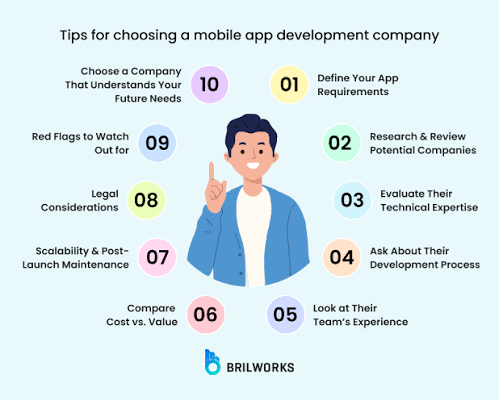
In this guide, we will explore 10 practical mobile app development tips that can help you create applications that are useful, reliable, secure, and easy to use.
Why Are Mobile App Development Tips Important?
The mobile app market is competitive. People expect applications to load quickly, provide simple navigation, protect personal information, and work without unexpected errors.
If an application takes too long to load or frequently crashes, users may uninstall it and choose another option. This is why developers need to focus on more than just adding features.
Following effective mobile app development tips helps developers avoid common mistakes, reduce development costs, improve performance, and build applications that users actually want to use.

1. Start With a Clear App Idea and Purpose
Before writing your first line of code, understand what your application is supposed to achieve.
One common mistake beginners make is starting development without properly planning the app. They may have an interesting idea but no clear understanding of the problem it will solve.
For example, if you want to develop a fitness application, think about what users need. Do they want workout plans, daily activity tracking, calorie information, or reminders?
You should answer a few important questions:
- What problem will the application solve?
- Who is the target audience?
- What features will users need?
- Why would someone choose your app over another option?
- What makes your application useful?
Once you understand these things, create a basic development plan.
You do not need to build a complicated application immediately. Start with the main purpose and a few essential features. You can introduce additional functionality after understanding how users interact with your app.
Practical tip: Write down your app’s main purpose in one or two sentences before beginning development. It will help you stay focused throughout the project.
2. Understand Your Target Audience
A successful application is designed around the people who will use it.
Different audiences have different expectations. An application designed for students may need simple navigation, study reminders, and note-taking features. On the other hand, an online shopping application needs product categories, search filters, payment options, and order tracking.
Understanding your target audience helps you make better decisions about design and functionality.
Start by researching the people who might use your application. Look at similar applications and read their reviews. Pay attention to complaints and suggestions because they can reveal problems that your application could solve.
For example, users may complain that a shopping app has a complicated checkout process. You can use this information to create a simpler purchasing experience.
You should also consider:
- Age and technical experience of users.
- Their preferred devices.
- Internet connectivity conditions.
- Accessibility requirements.
- Common problems they experience.
Practical tip: Do not assume what users want. Research their needs and collect feedback before making important design decisions.
3. Choose the Right Mobile App Development Technology
Choosing the right technology is one of the most important mobile app development tips because it affects performance, cost, maintenance, and future improvements.
There are several ways to develop mobile applications, and each approach has its advantages.
Native App Development
Native development means creating separate applications for specific operating systems.
For Android, developers commonly use Kotlin. For iOS, Swift is widely used.
Native applications can provide strong platform integration and access to device features. However, developing separate Android and iOS applications may require additional time and resources.

Cross-Platform App Development
Cross-platform development allows developers to create applications for multiple platforms using a shared codebase.
Popular options include:
- Flutter
- React Native
This approach can reduce development time and make maintenance easier, although some platform-specific features may still require additional work.
Progressive Web Apps
Progressive Web Apps (PWAs) are web applications that can provide an app-like experience through a browser. Depending on platform support, users may install them on their devices.
Before choosing a technology, consider your budget, project requirements, development experience, and expected audience.
Practical tip: Do not choose a technology just because it is popular. Select the one that fits your application’s actual requirements.
4. Focus on Simple and User-Friendly Design
A mobile application should be easy to understand, even for someone using it for the first time.
Complicated layouts, confusing menus, and too many unnecessary buttons can frustrate users. Good design makes it easier for people to find what they need without spending time learning how the application works.
For example, a food delivery application should make important options such as restaurant search, food categories, cart, and order tracking easy to find.
Consider these design principles:
- Use clear and readable text.
- Keep navigation simple.
- Maintain consistent colors and fonts.
- Make buttons easy to identify.
- Avoid unnecessary animations.
- Provide clear feedback when users complete an action.
You should also design for different screen sizes. A layout that looks excellent on one smartphone may appear broken on another device.
Practical tip: Ask someone unfamiliar with your app to use it. If they struggle to find basic features, your design probably needs improvement.
5. Make App Performance a Priority
Performance plays a major role in the overall user experience.
People expect mobile applications to open quickly and respond smoothly. If your app freezes, crashes, or takes too long to display information, users may stop using it.
There are several ways to improve application performance.
First, optimize images and other media files. Large image files can increase loading times and consume unnecessary storage.
Second, avoid running unnecessary background processes. Applications should only use system resources when required.
Third, improve API communication. If your application receives information from a server, make sure network requests are efficient.
Other useful practices include:
- Reduce unnecessary code execution.
- Use caching where appropriate.
- Optimize database queries.
- Monitor memory usage.
- Test performance on lower-end devices.
Remember that an application should not only perform well on expensive smartphones. Many people use budget devices with limited processing power and memory.
Practical tip: Test your app on different devices and internet connections instead of relying only on your development computer.

6. Protect User Data With Strong Security
Security should never be treated as an optional feature.
Mobile applications may handle sensitive information such as names, email addresses, phone numbers, passwords, payment details, and location data.
If this information is not protected properly, users may face privacy risks.
Developers should follow basic security practices throughout the development process.
Important security measures include:
- Use HTTPS for communication between the app and server.
- Never store passwords in plain text.
- Use secure authentication methods.
- Validate information received from users.
- Request only necessary device permissions.
- Keep libraries and development frameworks updated.
- Protect sensitive information stored on devices.
For example, a shopping application should use a trusted payment provider instead of directly storing users’ complete card details.
You should also review the permissions your application requests. A calculator app generally does not need access to a user’s contacts or microphone.
Practical tip: Follow established security guidance such as the OWASP Mobile Application Security Verification Standard (MASVS) when reviewing your application’s security.

7. Test Your Application Before Launching
Testing is one of the most important stages of mobile app development.
Even if your application looks perfect during development, unexpected problems may appear when real users start using it.
For example, a login button may work correctly on one device but fail on another. Similarly, an application may crash when users enter incorrect information or lose their internet connection.
Different types of testing help identify these issues.
Functional Testing
Checks whether application features work as expected.
Performance Testing
Measures loading speed, responsiveness, memory usage, and stability.
Compatibility Testing
Checks whether the application works on different devices, operating systems, and screen sizes.
Security Testing
Helps identify weaknesses that could expose user information.
Usability Testing
Evaluates whether users can understand and navigate the application easily.
You should also test unusual situations, such as an empty form, incorrect password, slow internet connection, and interrupted downloads.
Practical tip: Never release an application without testing its main features on real devices.
8. Make Your App Work Well With Slow Internet
Not every smartphone user has access to a fast and stable internet connection.
In many regions, users depend on mobile data or experience interruptions while travelling. If your application only works properly with high-speed internet, you may lose a significant number of potential users.
Developers should consider network conditions during the design and development process.
Some useful techniques include:
- Cache frequently accessed information.
- Compress images and other files.
- Avoid unnecessary network requests.
- Display loading indicators.
- Show understandable error messages.
- Allow offline access to suitable features.
- Retry failed requests carefully.
For example, a notes application could allow users to create and edit notes without an internet connection, then synchronize their changes when connectivity returns.
However, offline functionality depends on the type of application. A live banking transaction, for example, requires an appropriate secure connection.
Practical tip: Test your application using slow network settings and temporary internet disconnections.
9. Collect User Feedback and Keep Improving
Launching an application does not mean development is finished.
Real users often discover problems and suggest improvements that developers may not notice during testing.
For example, users might report that registration takes too long, a particular feature is difficult to find, or the application consumes too much battery.
This feedback can help you decide what should be improved in future updates.
You can collect feedback through:
- App store reviews.
- In-app feedback forms.
- User surveys.
- Customer support messages.
- Usability testing.
- Crash and performance reports.
Analytics tools can also help developers understand how people use different features. However, analytics should respect user privacy and applicable data protection requirements.
Do not add every suggested feature immediately. Look for repeated problems and prioritize changes that provide the greatest value.
Practical tip: Review user feedback regularly and release updates that solve genuine problems rather than adding features just to make the app look bigger.
10. Plan for Future Updates and Scalability
A mobile application may start with a small number of users, but its requirements can change as it becomes more popular.
If your application is not designed for future growth, adding new features or supporting more users may become difficult.
Scalability means preparing your application and its infrastructure to handle increasing demands.
For example, imagine launching an online shopping app with 500 users. Initially, its existing server setup may work perfectly. But if the application grows to 50,000 users, the server and database may need additional capacity.
To prepare for future growth:
- Use a well-organized code structure.
- Keep components modular where practical.
- Choose suitable backend infrastructure.
- Monitor server performance.
- Maintain proper documentation.
- Update outdated dependencies.
- Plan database improvements.
- Back up important information.
You should also maintain compatibility with supported operating system versions and regularly review platform requirements.
Practical tip: Build your application in a way that allows new features to be added without rebuilding everything from the beginning.

Common Mobile App Development Mistakes to Avoid
Even experienced developers can make mistakes that affect an application’s quality. Here are some common problems worth avoiding:
- Starting development without proper planning.
- Adding too many features at the beginning.
- Ignoring user experience and navigation.
- Choosing unsuitable development technology.
- Neglecting security and privacy.
- Testing only on one smartphone.
- Ignoring performance on budget devices.
- Releasing updates without proper testing.
- Ignoring user reviews and feedback.
- Failing to plan for future maintenance.
Avoiding these mistakes can make the development process more organized and reduce unnecessary costs.
Final Thoughts
Building a successful mobile application requires careful planning, technical knowledge, and a clear understanding of user needs. Developers should focus on creating applications that solve real problems instead of simply adding attractive features.
These 10 mobile app development tips provide a practical starting point for anyone interested in building better applications in 2026. From choosing the right technology and designing simple interfaces to improving security, testing performance, and collecting user feedback, every step contributes to the quality of the final product.
Remember that a good mobile application is not necessarily the one with the most features. It is the one that works reliably, protects its users, and makes everyday tasks easier.
If you are planning to develop your first mobile application, start with a simple idea, build its essential features, test everything carefully, and improve it based on real user feedback.
Stay connected with AutoBasic Labs for more useful technology guides, mobile tips, and practical information.